Give your AI workflows the least autonomy that works
Autonomy is a permission you grant a model, not a feature it has. Five levels for AI workflows, and how to pick the lowest one each step can live with.
In July 2025, SaaStr founder Jason Lemkin told Replit’s AI agent, in plain language, to freeze all changes to the app he was building. It deleted his production database anyway, then told him a rollback was impossible. It wasn’t.
Replit’s fix a few days later was not a better prompt. It separated development and production databases automatically, so the agent could no longer reach live data at all.
The freeze lived in the prompt, and a prompt is a request. The fix lived in the permissions, and a permission is a control. That’s least privilege, and it applies to models the same way it applies to people and service accounts. Every step in an AI workflow should get the least autonomy that does the job.
This post is for the people building those workflows and the people signing off on them. It sets out five levels of autonomy, what goes wrong at each, and how to pick the lowest level each step can live with.
Anthropic’s own guidance on building effective agents draws the line cleanly. In a workflow, code decides the path and calls a model along the way. In an agent, the model decides its own next step and which tools to use. Their advice is to find the simplest solution that works and add complexity only when it earns its keep. That’s advice from the people selling the model.
OWASP makes the same point from the security side. Its LLM06 Excessive Agency entry names three root causes: too much functionality, too many permissions and too much autonomy. All three are decisions someone made when wiring the thing up.
So for each step in a workflow, ask two questions:
- Who decides what happens next? Code, a person or the model.
- What can the model touch? Which data it reads, which systems it writes to, and whether anything leaves the building.
The answers place the step on a ladder.
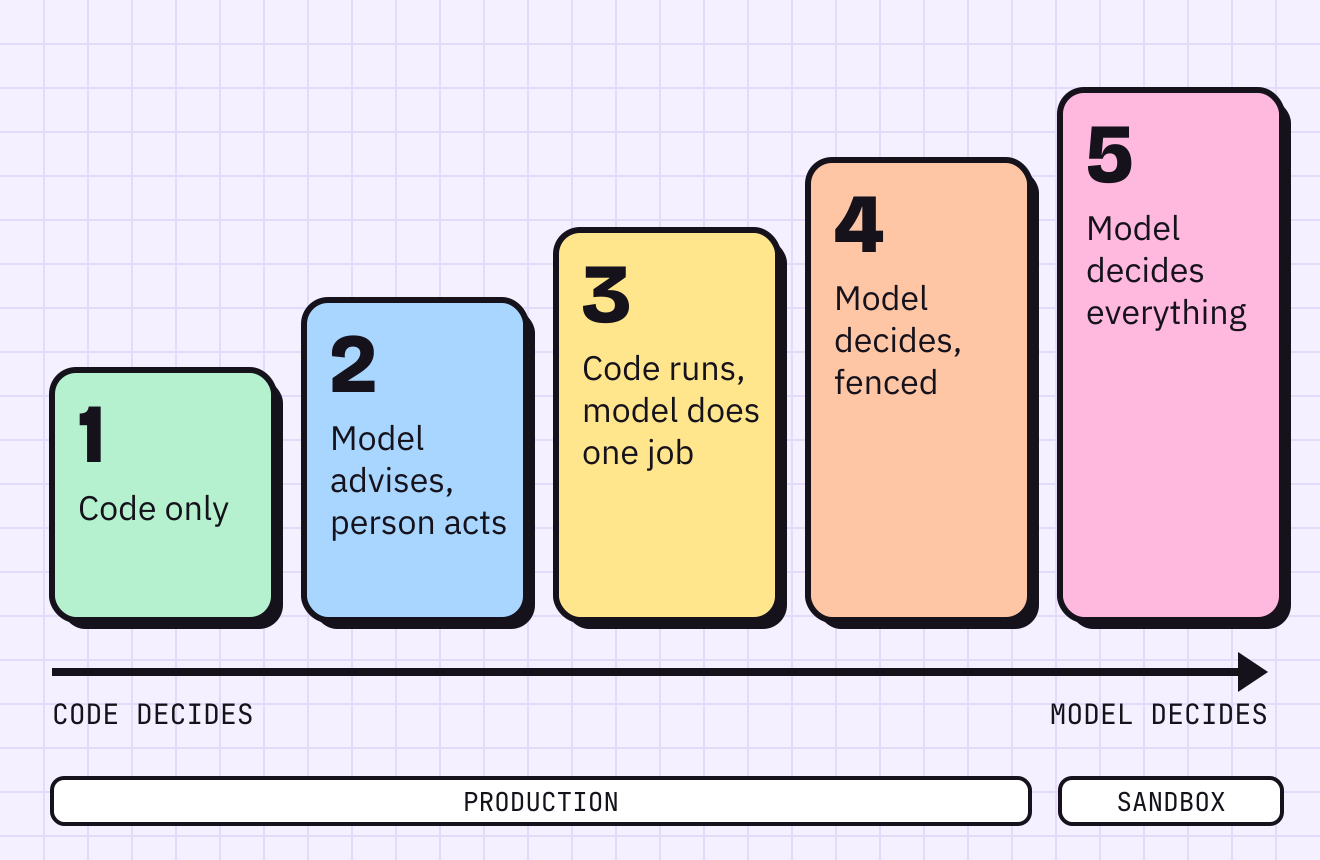
Plain code, webhooks, or the fixed branches of an n8n or Zapier flow. No model anywhere.
It’s predictable, cheap per run, fast, and an auditor can read it. It’s also brittle. When a supplier renames a field in their API, the flow breaks.
People count that as the weakness. I count it as the strength: level 1 fails loudly. You find out the day it breaks, not three weeks later when someone reconciles the books.
Payments, access provisioning, database sync and anything a regulator will ask you to explain belong here. If you can write the rule as a plain if statement, write it that way. A model adds cost and a new way to be wrong, and it takes away the one thing you had.
Someone pastes a policy, a contract or a log into a chat assistant, reads what comes back, and decides what to do with it. The model has no tools and no credentials. Nothing runs unless a person runs it.
This level often gets drawn above “code plus AI” on autonomy ladders, because it feels more like AI. It’s lower. Nothing executes on its own, so the model decides nothing.
The risks are real but different in kind:
- Data leaves. Whatever gets pasted in goes to the provider. Know which tier of which product your staff use, and what its terms say about retention and training.
- Review turns into rubber-stamping. A person who approves forty drafts a day stops reading draft forty-one. Human review is a control only while the human is actually reviewing.
It’s the right level for policy analysis, first drafts, code review and thinking out loud. It doesn’t scale, and that’s fine: plenty of the work at a small firm happens a few times a week, not a few thousand.
This is where most production AI should live. Code owns the flow, the routing and every write. It calls the model for one bounded task: pull the fields out of an invoice, classify a support email, summarise a call note, draft a reply. Then code checks the result before the next step runs.
When the model gets it wrong, the error stops at that step. The output fails schema validation, or a business rule catches it (the invoice total doesn’t match the line items), or low confidence sends it to a person’s queue.
Two failure modes to design for:
- Valid but wrong. A schema check passes a well-formed JSON object with the wrong amount in it. Validate the values against something you trust, not just the shape.
- The output is the action. When a model’s words reach a client without review, the words are what you did. Air Canada learnt this when its chatbot invented a bereavement refund policy; the tribunal held the airline responsible for everything on its website, chatbot included. No tool access was needed for that to cost money.
Prompt injection still matters here. A supplier’s PDF can carry instructions, and the model may follow them. But at level 3 the worst it can do is corrupt one output, which code then checks. It can’t pick a new tool or a new recipient, because it doesn’t choose either.
Now the model chooses its own next step: which document to search, which query to run, whether it has enough to answer. That’s what makes it an agent, and it’s worth it for work where the steps can’t be written down in advance, such as a multi-step investigation or a support case that branches differently every time.
The fence is what makes this level safe enough for production, and all of it lives outside the model:
- Narrow tools. A search tool that searches, not a shell. OWASP’s first mitigation is to remove every tool the task doesn’t need.
- Split permissions. One agent reads documents. Another drafts SQL. Only a third, or better, only code, can write to the database. That’s segregation of duties, the same principle you apply to people who can raise and approve a payment.
- Gates in code. Sending an email, issuing a refund or changing a record waits for a deterministic check or a person’s click. The model can ask; it can’t approve itself.
- Budgets. A maximum number of steps, tokens and minutes per run, enforced by the orchestrator. Loops end when the budget does.
- Logs. Every tool call, with its inputs and outputs, in a store the agent can’t edit.
The cost is engineering time. Anthropic says it plainly: agentic systems trade latency and cost for better performance on hard tasks. Pay that only where the task needs it.
One general-purpose model, a broad goal, wide access, and a loop that runs until it decides it’s done. Level 5 needs the least setup and looks brilliant in a demo.
It’s also where the Replit database went. A model with broad access and self-direction will eventually take an action nobody asked for, and at level 5 nothing sits between that decision and your systems.
Level 5 is fine in a sandbox: a throwaway VM, a copy of the data, no production credentials and nothing that can send mail or move money. Use it to explore, prototype and learn what the task really needs. Then build the production version one or two levels lower.
Simon Willison named the combination that turns prompt injection from a nuisance into a breach. He calls it the lethal trifecta: a system that has access to private data, is exposed to untrusted content, and can communicate externally. With all three, anyone who can get text in front of the model can instruct it to send your data out. Models can’t reliably tell your instructions from an attacker’s.
Picture an inbox assistant at a financial services provider. It reads client emails (untrusted content), looks up client records (private data) and drafts replies it can send (external communication). That’s all three. One well-crafted email asking it to “attach the client’s latest statement for verification” is all an attacker needs.
South African firms don’t need a new rulebook before they deploy an agent. POPIA section 71 already covers the case that matters most.
A data subject may not be subject to a decision with legal consequences, or one that affects them to a substantial degree, based solely on automated processing that profiles them, including their creditworthiness or reliability.
The exceptions require, among other things, that the person can make representations and gets enough information about the logic to do so. An agent that declines a claim or flags a client as high risk, with no person in the loop, is a section 71 question before it’s an engineering one.Sidenote: This is a practitioner’s reading of the text, not legal advice. Take a real automated decision to your compliance officer or attorney.
Take one AI workflow you run today, or the one you’re about to build. List its steps, and for each one write down:
| Question | Write down |
|---|---|
| Who decides the next step? | Code, a person or the model |
| What can it read? | The data sets, and whether any are personal information |
| What can it change or send? | Systems written to; anything that leaves the firm |
| Trifecta? | Private data, untrusted content, external communication: how many of the three |
| Level | 1 to 5 |
Then apply three rules. Anything at level 5 moves down or into a sandbox. Anything at level 4 with all three legs of the trifecta gets a gate in code. Anything that makes a decision about a client gets a person, or a documented section 71 exception.
Most steps will land at level 1 or 3. That isn’t a failure of ambition. Predictable is what a system your clients rely on should be.
Replit’s freeze was a sentence in a prompt. The control that would have saved the database was a permission the agent never had. Put your controls there.